Inkwell Tutorial: Processing Your First Podcast Episode
Time Required: 10 minutes Difficulty: Beginner Prerequisites: Python 3.10+, ffmpeg, API keys
What We'll Build
By the end of this tutorial, you'll have: - ✅ Inkwell installed and configured - ✅ A podcast feed added - ✅ Your first episode processed - ✅ Structured markdown notes in Obsidian - ✅ Understanding of costs and optimization
Step 1: Installation (3 minutes)
1.1 Install uv
1.2 Install Inkwell
1.3 Install ffmpeg
macOS:
Ubuntu/Debian:
1.4 Verify Installation
Step 2: API Keys (2 minutes)
2.1 Get Google AI API Key
- Go to https://aistudio.google.com/api-keys
- Click "Create API Key"
- Select a project (or create new)
- Copy your API key
2.2 Configure API Key (Recommended)
Use the Inkwell CLI to store your API key in the config file:
This stores the key in Inkwell's config file, scoped to this tool only.
Gemini extraction uses this key too unless you set extraction.gemini_api_key
separately.
Alternative: Environment Variables
If you prefer environment variables (useful if you use the same key across multiple tools):
# Temporary (current session)
export GOOGLE_API_KEY="your-google-ai-api-key-here"

# Permanent (add to ~/.zshrc or ~/.bashrc)
echo 'export GOOGLE_API_KEY="your-google-ai-api-key-here"' >> ~/.zshrc
source ~/.zshrc
2.3 Set Output Directory (Optional)
By default, Inkwell saves processed episodes to ~/podcasts. To change this:
You can also specify a different directory per-command using the --output flag.
2.4 Verify Configuration
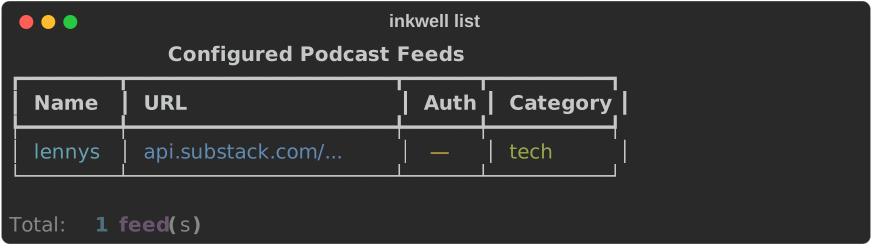
Step 3: Add Your First Podcast (1 minute)
Let's add Lenny's Podcast (a popular product and growth podcast):
inkwell add \
  "https://api.substack.com/feed/podcast/10845.rss" \
  --feed-name lennys \
  --category tech
Output:
3.1 List Available Episodes
Output:
Step 4: Process Your First Episode (3 minutes)
4.1 Fetch Latest Episode
What Happens
- Downloads episode metadata
- Checks for YouTube transcript (free!)
- Extracts content using Gemini
- Generates markdown with wikilinks and tags
- Tracks costs
Output:
Processing: Building a Growth Team

Transcription: YouTube API (free) ✓
Extraction:    Gemini Flash      ✓

Templates:     4 (summary, quotes, key-concepts, tools-mentioned)
Cost:          $0.0055
Output:        ./output/lennys-2025-11-10-building-a-growth-team/

✓ Complete!
4.2 Explore the Output
Files Created:
.metadata.yaml          # Episode metadata and costs
summary.md              # AI-generated summary
quotes.md               # Notable quotes
key-concepts.md         # Key concepts explained
tools-mentioned.md      # Tools and resources
4.3 View a File
Example Output:
---
title: Summary
podcast: Lenny's Podcast
episode: Building a Growth Team
episode_date: 2025-11-10
duration_minutes: 45
rating: 4
status: inbox
tags: [podcast, growth, product-management, startups]
has_wikilinks: true
cost_usd: 0.0055
---

# Building a Growth Team

## Overview

In this episode, Lenny discusses how to build and structure a growth team with a seasoned growth leader. They cover [[Growth Loops]], [[A/B Testing]], [[Product-Led Growth]], and team composition strategies.

## Key Takeaways

- **[[Growth Teams]]** should be cross-functional with engineering, design, and data
- **[[Experimentation Velocity]]** is more important than individual experiment wins
- **[[North Star Metrics]]** help align the team on what matters
- Start with [[Activation]] before focusing on [[Retention]]

## Practical Applications

The guest shares how they structured growth at their company and common pitfalls to avoid when scaling.

## Related Topics

- #growth #product-management #startups
- [[Product-Led Growth]] [[Experimentation]] [[User Activation]]
Step 5: Open in Obsidian (1 minute)
5.1 Configure Obsidian Vault
- Open Obsidian
- Open your vault (or create new one)
- Copy episode folder to vault:
5.2 Navigate to Notes
In Obsidian:
1. Open Files pane (Ctrl/Cmd + O)
2. Navigate to podcasts/lennys-2025-11-10-building-a-growth-team/
3. Open summary.md
5.3 Try Wikilinks
Click on any [[Growth Teams]] link - Obsidian will:
- Create a backlink
- Allow you to create a new note for that topic
- Show related notes
5.4 Use Dataview
Create a new note called "Podcast Dashboard":
# Podcast Dashboard

## Recent Episodes
```dataview
TABLE episode, rating, duration_minutes, cost_usd
FROM "podcasts"
WHERE template = "obsidian-note"
SORT episode_date DESC
LIMIT 10
By Topic
Output:
┌ Overall ─────────────────────┐
│ Total Operations:  1          │
│ Total Cost:        $0.0055    │
│                               │
│ By Provider:                  │
│   gemini    $0.0055           │
│                               │
│ By Operation:                 │
│   extraction    $0.0055       │
└───────────────────────────────┘
Cost Breakdown: - Transcription: $0.00 (YouTube was free!) - Extraction: $0.0055 (Gemini Flash) - Total: $0.0055 ✨
Step 7: Process with Interview (Optional, +5 minutes)
Try interactive interview mode to capture your insights:
Interactive Session:
Episode processed! Starting interview...

Q: What was your main takeaway from this episode?
A: Growth teams need to be cross-functional from day one.

Q: How does this relate to your current work?
A: We're building our first growth team. Need to involve engineering earlier.

Q: What will you do differently based on this?
A: Set up a weekly experimentation review with the whole team.

Q: Any resources to follow up on?
A: Read Lenny's newsletter on growth loops, check out Reforge courses.

✓ Interview complete! Saved to my-notes.md
What You Learned
✅ Installation: Set up Inkwell and dependencies ✅ Configuration: API keys and basic settings ✅ Feed Management: Add and list podcast feeds ✅ Episode Processing: Fetch and extract content ✅ Obsidian Integration: Wikilinks, tags, Dataview ✅ Cost Tracking: Monitor and optimize spending ✅ Interview Mode: Capture personal insights
Next Steps
Process More Episodes
# Process latest 5 episodes
inkwell fetch lennys --count 5

# Process specific episode
inkwell fetch lennys --episode 789
Try Different Podcasts
# Add more podcasts
inkwell add "https://feeds.simplecast.com/54nAGcIl" --feed-name syntax

# Process
inkwell fetch syntax --latest
Customize Configuration
# Edit config
inkwell config edit

# Try different settings:
# - Change output directory
# - Enable/disable specific templates
# - Adjust tag limits
# - Configure Dataview fields
Explore Advanced Features
- Custom Templates: Create your own extraction templates
- Batch Processing: Process multiple episodes automatically
- Cost Optimization: Strategies to minimize API costs
- Dataview Queries: Advanced Obsidian queries
Troubleshooting
"No API key found"
Make sure you exported the API key:
"ffmpeg not found"
Install ffmpeg:
"Episode already exists"
Use --overwrite to replace:
High Costs
Check if YouTube transcript is available (free):
If using Gemini transcription frequently, consider: - Caching transcripts - Batch processing - Setting cost limits
Summary
You've learned how to: 1. Install and configure Inkwell 2. Add podcast feeds 3. Process episodes automatically 4. Generate Obsidian-ready notes 5. Track costs 6. Use interview mode
Typical Workflow:
# Daily routine (2 minutes)
inkwell fetch lennys --latest
inkwell fetch syntax --latest
inkwell costs

# Weekly review (5 minutes)
# Open Obsidian, review notes, update ratings
Next Steps: - Processing Guide - Templates Reference
Feedback
Questions or issues? - GitHub Issues: https://github.com/chekos/inkwell-cli/issues - Documentation: https://chekos.github.io/inkwell-cli/
Happy note-taking! 🎧📝