Quick Start
Process your first podcast episode in under 5 minutes.
Prerequisites
- Inkwell installed (
uv tool install inkwell-cli) - ffmpeg installed
- Google AI API key
Step 1: Set Your API Key
The same key is used for Gemini extraction unless you set
extraction.gemini_api_key separately.
Or use an environment variable:
Step 2: Process an Episode
You can process any YouTube video or podcast episode directly:
Inkwell shows live pipeline progress as it works, then a summary when done:
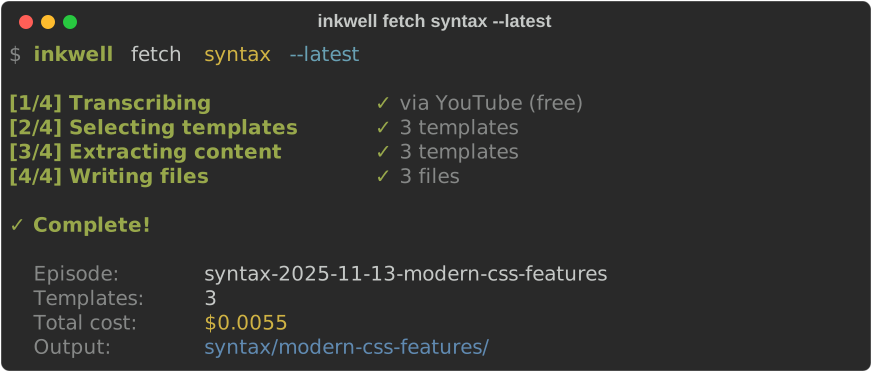
What happens:
- Inkwell checks for a free YouTube transcript
- If unavailable, it transcribes using the configured Gemini model
- AI extracts key information (summary, quotes, concepts)
- Markdown files are created in your output directory
Step 3: View Your Notes
You'll see a folder for each processed episode:
~/inkwell-notes/
└── podcast-2025-01-15-episode-title/
    ├── .metadata.yaml
    ├── summary.md
    ├── quotes.md
    ├── key-concepts.md
    └── tools-mentioned.md
Open any .md file to see your structured notes!
Optional: Add a Podcast Feed
For recurring podcasts, add the feed once:
# Add a feed
inkwell add "https://example.com/podcast/feed.rss" --feed-name my-podcast

# List your feeds
inkwell list

# Process the latest episode
inkwell fetch my-podcast --latest
Optional: Interview Mode
Capture your personal insights with guided Q&A:
# Requires Anthropic API key
export ANTHROPIC_API_KEY="your-key"

# Process with interview
inkwell fetch my-podcast --latest --interview
Check Your Costs
Typical costs:
- YouTube transcript: Free
- Gemini transcription: ~$0.01/hour of audio
- Extraction (3 templates): ~$0.005
Next Steps
- Your First Episode - Detailed tutorial
- Managing Feeds - Add more podcasts
- Content Extraction - Customize templates
- Obsidian Integration - Use with Obsidian